In today’s digital world, data is one of the most valuable assets for businesses and individuals. Organizations rely heavily on data to make informed decisions, identify trends, and gain a competitive advantage.
One of the most efficient ways to collect large amounts of data from websites is through web scraping.
This technique allows users to extract structured data from web pages automatically, saving time and effort compared to manual data collection.
What is Web Scraping?
Web scraping is the process of extracting data from websites using automated tools or scripts.
It involves:
- Sending a request to a website
- Downloading the HTML content
- Parsing the data
- Extracting relevant information
For example, a company might use web scraping to collect product prices from e-commerce websites to monitor competitors.
Why Web Scraping is Important
Web scraping plays a crucial role in modern data-driven environments.
Key reasons:
- Helps gather large datasets quickly
- Enables market research and analysis
- Supports business intelligence
- Automates repetitive tasks
Use cases include:
- Price comparison
- Lead generation
- Sentiment analysis
- Data aggregation
How Web Scraping Works
Web scraping typically follows these steps:
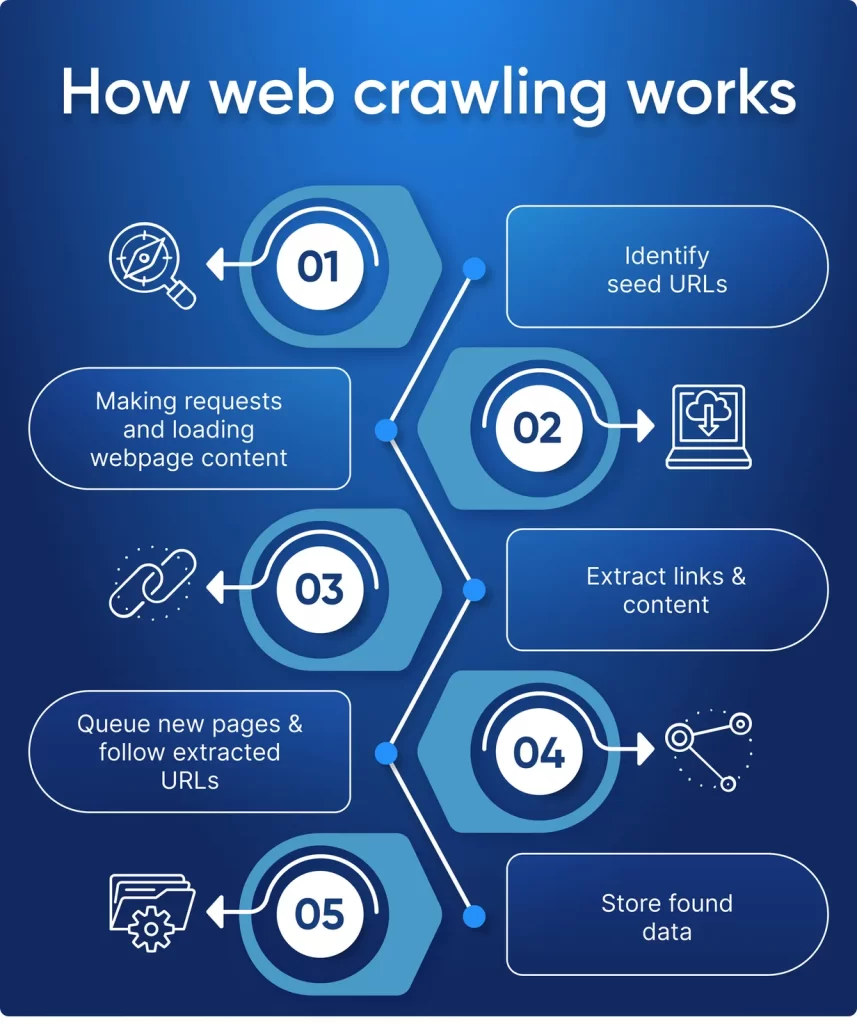
Step-by-step process:
- Identify the target website
- Send HTTP requests
- Retrieve HTML content
- Parse HTML using tools
- Extract required data
- Store data in structured format
Technologies involved:
- HTML and CSS
- HTTP protocols
- Parsing libraries
Types of Web Scraping
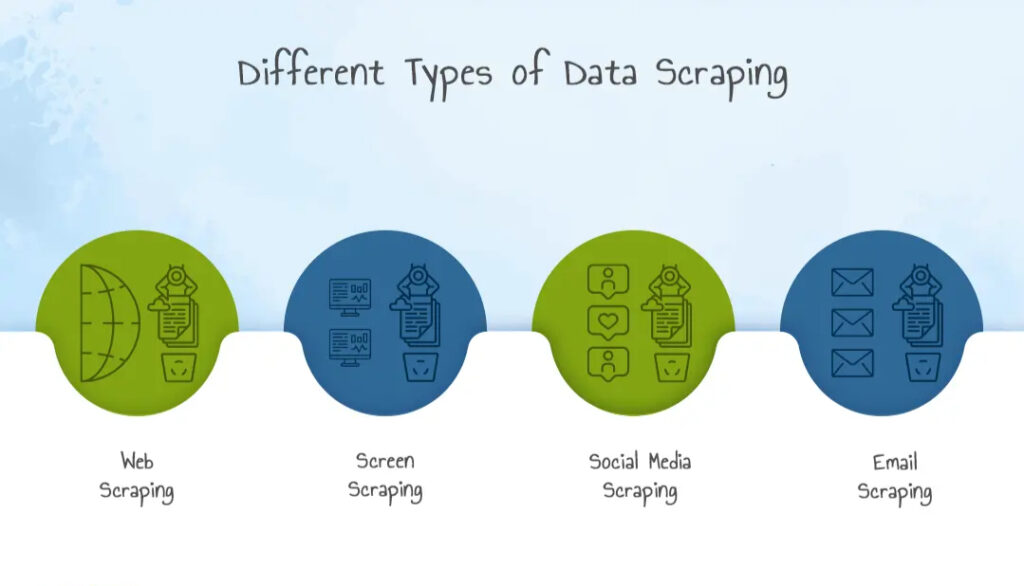
Web scraping can be categorized into different types based on use and complexity.
1. Manual Scraping
- Copying and pasting data manually
- Time-consuming
2. Automated Scraping
- Using scripts and tools
- Fast and scalable
3. Web Crawling
- Collecting URLs and navigating pages
4. Screen Scraping
- Extracting data from visual interfaces
Popular Web Scraping Tools and Libraries
Several tools make web scraping easier and more efficient.
Programming-based tools:
- Python (BeautifulSoup, Scrapy)
- Selenium for dynamic websites
No-code tools:
- Octoparse
- ParseHub
Browser-based tools:
- Chrome Developer Tools
Web Scraping Using Python
Python is one of the most popular languages for web scraping.
Example using BeautifulSoup:
import requests
from bs4 import BeautifulSoup
url = "https://example.com"
response = requests.get(url)
soup = BeautifulSoup(response.text, 'html.parser')
for title in soup.find_all('h2'):
print(title.text)
Why Python?
- Easy to learn
- Large community support
- Powerful libraries
Web Scraping Techniques
As websites become more complex, basic scraping methods are often not enough. Advanced techniques help extract data from modern, dynamic platforms.
Handling JavaScript-Rendered Content
Many websites use JavaScript frameworks like React or Angular. Traditional scraping tools cannot access this content directly.
Solutions:
- Use Selenium to render pages
- Use headless browsers like Puppeteer
- Use Playwright for modern automation
Pagination Handling
Data is often spread across multiple pages.
Approach:
- Identify pagination patterns in URLs
- Automate page navigation
- Loop through all pages to collect data
Handling Infinite Scroll
Some websites load data dynamically when scrolling.
Techniques:
- Simulate scrolling using Selenium
- Trigger JavaScript events
- Capture API calls in the network tab
Data Cleaning After Web Scraping
Raw scraped data is often messy and unstructured.
Common Issues:
- Missing values
- Duplicate entries
- Incorrect formats
Data Cleaning Steps:
- Remove duplicates
- Handle null values
- Normalize text
- Convert data types
Tools for Cleaning:
Storing Scraped Data Efficiently
Once data is extracted, it must be stored properly.
Storage Options:
1. CSV Files
- Simple and easy
- Best for small datasets
2. Databases
- MySQL, PostgreSQL
- Suitable for large-scale data
3. NoSQL Databases
- MongoDB
- Flexible schema
4. Cloud Storage
- AWS S3
- Google Cloud Storage
Automating Web Scraping Pipelines
Automation ensures continuous data collection.
Key Components:
- Scheduler (Cron Jobs)
- Data extraction scripts
- Data storage system
- Monitoring tools
Example Workflow:
- Schedule scraper to run daily
- Extract updated data
- Clean and process data
- Store in database
- Generate reports
Web Scraping for Machine Learning Projects
Web scraping is widely used to build datasets for AI and machine learning.
Use Cases:
- Training NLP models using text data
- Image datasets for computer vision
- Financial forecasting datasets
Example:
A sentiment analysis model can use scraped tweets or reviews to train its algorithm.
Web Scraping for Business Intelligence
Organizations use web scraping for strategic decision-making.
Applications:
- Competitor analysis
- Market trend tracking
- Customer sentiment analysis
- Pricing strategy optimization
Example:
An e-commerce company scrapes competitor pricing data daily to adjust its pricing dynamically.
Common Anti-Scraping Techniques Used by Websites
Websites often try to block scraping activities.
Techniques Used:
- CAPTCHA verification
- IP blocking
- Rate limiting
- JavaScript obfuscation
How to Handle Them:
- Use rotating proxies
- Add request delays
- Use user-agent headers
- Respect website policies
Web Scraping Architecture for Large-Scale Systems
For enterprise-level scraping, a scalable architecture is required.
Components:
- Distributed scrapers
- Load balancers
- Proxy servers
- Data pipelines
Architecture Flow:
Scraper → Proxy → Data Processing → Database → Dashboard
Tools Comparison for Web Scraping
| Tool | Best For | Complexity | Use Case |
| BeautifulSoup | Beginners | Low | Static pages |
| Scrapy | Advanced users | Medium | Large-scale scraping |
| Selenium | Dynamic websites | High | JavaScript content |
| Playwright | Modern scraping | Medium | Automation |
Real-World Case Study
Case Study: Price Intelligence System
A retail company implemented web scraping to track competitor prices.
Steps Taken:
- Scraped product data from multiple websites
- Stored data in a centralized database
- Used analytics dashboards
Results:
- Improved pricing strategy
- Increased sales
- Better market positioning
Web Scraping for SEO and Digital Marketing
Web scraping plays a key role in SEO strategies.
Applications:
- Keyword research
- Competitor analysis
- Backlink tracking
- Content gap analysis
Example:
Marketers scrape search engine results to analyze top-ranking content.
Ethical Web Scraping Framework
To ensure responsible scraping, follow a structured approach:
Ethical Checklist:
- Check robots.txt
- Respect rate limits
- Avoid scraping personal data
- Use data for legitimate purposes
Integration with Data Visualization Tools
Scraped data becomes more valuable when visualized.
Tools:
- Power BI
- Tableau
- Matplotlib (Python)
Example:
Visualizing competitor pricing trends over time.
Proxy Management in Web Scraping
When scraping at scale, sending repeated requests from a single IP can lead to blocking. Proxy management helps distribute requests across multiple IPs.
Types of Proxies:
- Datacenter Proxies: Fast but easier to detect
- Residential Proxies: Harder to detect, mimic real users
- Rotating Proxies: Automatically change IPs per request
Why Proxy Management Matters:
- Prevents IP bans
- Enables large-scale scraping
- Improves reliability
User-Agent Rotation Strategy
Websites often detect bots based on request headers.
What is a User-Agent?
A string that identifies the browser and device making the request.
Best Practice:
- Rotate user-agent strings
- Mimic real browsers (Chrome, Firefox)
- Combine with proxy rotation
Rate Limiting and Throttling
Sending too many requests in a short time can trigger blocking.
Techniques:
- Add delays between requests
- Use exponential backoff
- Randomize request intervals
Example:
Instead of sending 100 requests per second, spread them over time to mimic human behavior.
Handling CAPTCHAs in Web Scraping
CAPTCHAs are designed to prevent automated access.
Types:
- Image-based CAPTCHA
- reCAPTCHA
- Invisible CAPTCHA
Approaches:
- Avoid triggering CAPTCHA
- Use human-like browsing patterns
- Use third-party CAPTCHA solving services (with caution)
Structured Data Extraction (JSON, XML)
Many websites embed structured data.
Formats:
- JSON (JavaScript Object Notation)
- XML (Extensible Markup Language)
Advantage:
- Easier to parse than HTML
- More reliable data extraction
Tip:
Inspect network requests to find API endpoints returning JSON data.
Web Scraping with APIs (Hybrid Approach)
Sometimes websites use APIs internally.
Strategy:
- Open browser developer tools
- Monitor network calls
- Extract API endpoints
- Use them instead of scraping HTML
Benefit:
- Faster
- Cleaner data
- Less prone to break
Error Handling in Web Scraping
Robust scripts must handle errors gracefully.
Common Errors:
- Connection timeouts
- Missing elements
- HTTP errors (404, 500)
Best Practices:
- Use try-except blocks
- Log errors for debugging
- Retry failed requests
Logging and Monitoring Scrapers
Tracking scraper performance is essential.
What to Monitor:
- Request success rate
- Data accuracy
- Scraper uptime
Tools:
- Logging frameworks (Python logging module)
- Monitoring dashboards
Version Control for Scraping Scripts
Maintaining code versions helps manage updates.
Benefits:
- Track changes
- Rollback errors
- Collaborate with teams
Tools:
- Git
- GitHub
Web Scraping and Big Data Integration
For large-scale scraping, integration with big data systems is required.
Technologies:
- Hadoop
- Spark
- Kafka
Use Case:
Streaming scraped data into real-time analytics systems.
Building a Web Scraping Dashboard
Visual dashboards help interpret scraped data.
Features:
- Data visualization
- Filters and search
- Real-time updates
Tools:
- Power BI
- Tableau
- Dash (Python)
Data Validation Techniques
Ensuring accuracy is critical.
Methods:
- Cross-check data sources
- Validate formats
- Detect anomalies
Example:
If scraping prices, ensure values are numeric and within expected range.
Multi-Threading and Parallel Scraping
To speed up scraping, parallel execution is used.
Benefits:
- Faster data collection
- Efficient resource usage
Techniques:
- Threading
- Async programming
Web Scraping in Competitive Intelligence
Companies use scraping for strategic insights.
Data Collected:
- Competitor pricing
- Product availability
- Customer reviews
Outcome:
- Better business decisions
- Market positioning
Web Scraping for Academic Research
Researchers use scraping for:
- Social science studies
- Economic data collection
- Public opinion analysis
Common Mistakes in Web Scraping
Avoid these pitfalls:
- Ignoring legal guidelines
- Not handling dynamic content
- Overloading servers
- Poor data cleaning
- Hardcoding selectors
Building a Portfolio with Web Scraping Projects
To showcase your skills, create projects like:
- E-commerce price tracker
- Job aggregator
- News scraper
- Stock data collector
Performance Optimization Techniques
Improve scraper efficiency by:
- Minimizing requests
- Using caching
- Optimizing parsing logic
- Reducing unnecessary data extraction
Security Considerations in Web Scraping
Protect your systems:
- Avoid malicious websites
- Secure stored data
- Use HTTPS requests
Web Scraping Career Opportunities
Web scraping skills are valuable in many roles:
Career Paths:
- Data Analyst
- Data Scientist
- Machine Learning Engineer
- Business Intelligence Analyst
Why It Matters:
- High demand for data skills
- Strong foundation for AI and analytics
Web Scraping in Real-Time Systems
Modern applications require real-time data.
Use Cases:
- Stock market tracking
- News monitoring
- Social media analytics
Technologies:
- Streaming pipelines
- Real-time APIs
- Event-driven systems
Real-Time Examples of Web Scraping
Example 1: E-commerce Price Monitoring
Companies track product prices across competitors to adjust their pricing strategy.
Example 2: Job Listings Aggregation
Web scraping collects job postings from multiple portals into one platform.
Example 3: News Aggregation
Apps gather news articles from various sources in real time.
Example 4: Social Media Analysis
Brands analyze trends and sentiment using scraped data.
Benefits of Web Scraping
Key advantages:
- Saves time and effort
- Enables large-scale data collection
- Improves decision-making
- Supports automation
Business benefits:
- Competitive intelligence
- Better market insights
- Enhanced productivity
Challenges in Web Scraping
Despite its advantages, web scraping has challenges.
Common issues:
- Website structure changes
- Anti-scraping mechanisms
- CAPTCHA restrictions
- IP blocking
Technical challenges:
- Handling dynamic content
- Managing large datasets
- Ensuring data accuracy
Legal and Ethical Considerations
Web scraping must be done responsibly.
Important factors:
- Respect website terms of service
- Avoid scraping sensitive data
- Follow robots.txt guidelines
Ethical practices:
- Do not overload servers
- Use data responsibly
- Maintain transparency
Best Practices for Web Scraping
To ensure efficient and safe scraping:
Recommended practices:
- Use APIs when available
- Implement delays between requests
- Rotate IP addresses
- Handle errors properly
- Store data securely
Web Scraping vs APIs
Web Scraping:
- Extracts data from HTML
- Works when APIs are unavailable
APIs:
- Structured data access
- More reliable and legal
Comparison:
| Feature | Web Scraping | API |
| Data Format | Unstructured | Structured |
| Reliability | Medium | High |
| Complexity | High | Low |
Future of Web Scraping
Web scraping is evolving with advancements in AI and automation.
Emerging trends:
- AI-powered scraping tools
- Intelligent data extraction
- Integration with machine learning
- Real-time data pipelines
Web scraping will continue to play a key role in data science and analytics.
Conclusion
Web scraping is a powerful technique for extracting data from websites and transforming it into valuable insights.
From business intelligence to research and automation, its applications are vast and impactful.
However, it is essential to follow ethical practices, respect legal guidelines, and use appropriate tools to ensure efficient and responsible data extraction.
As data continues to grow in importance, mastering web scraping will become an essential skill for professionals in data science, analytics, and technology.
FAQ’s
What are the 4 types of scrapers?
The four types of web scrapers are browser-based scrapers, API-based scrapers, DOM parsers, and headless scrapers, each designed to extract data using different methods and levels of automation.
Is BeautifulSoup illegal?
No, Beautiful Soup is not illegal. It is a legitimate Python library used for web scraping and parsing HTML/XML.
However, how you use it matters—scraping websites that violate their terms of service, copyright rules, or data privacy laws can be restricted or illegal in some cases.
What is web scraping?
Web scraping is the process of automatically extracting data from websites using software tools or scripts, often for analysis, research, or automation purposes.
What is the biggest scraper?
The “biggest scraper” isn’t a single tool but refers to large-scale web crawlers like Googlebot, which systematically scan and index vast portions of the internet for search engines.
What is the best tool for scraping?
The best web scraping tool depends on your needs: Beautiful Soup for beginners, Scrapy for large-scale projects, and Selenium for dynamic websites, while no-code tools like Octoparse are ideal for non-developers.


