
Data science often begins with simple yet structured datasets that help learners understand classification, visualization, and predictive modeling. Among these, the Iris Dataset stands as one of the most widely used introductory datasets in statistics and machine learning.
Before diving into machine learning applications, it is essential to understand the biological background of iris flowers, the dataset structure, and how it connects to real-world predictive systems.
This comprehensive guide explains iris flowers, iris tabs, types of iris species, and how the Iris Dataset is applied in modern analytics.
Understanding Iris in Biology
The iris is a genus of flowering plants known for their vibrant colors and distinctive petal patterns. These plants are widely cultivated for ornamental purposes and have significant botanical importance.
Key characteristics:
- Perennial flowering plant
- Sword-shaped leaves
- Showy, colorful petals
- Found across temperate regions
The iris flower is divided into three outer sepals and three inner petals. These physical features form the foundation of the dataset measurements used in machine learning classification tasks.
Types of Iris Flowers
There are several species of iris flowers. The three most commonly studied species in machine learning are:
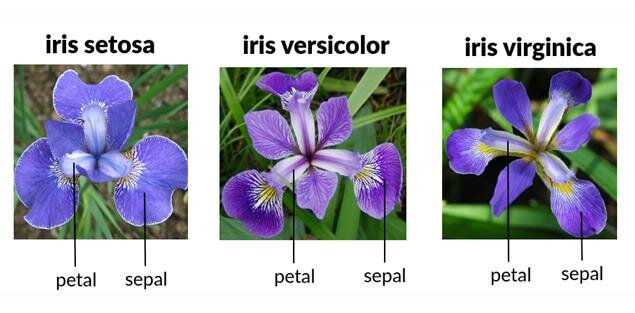
- Iris Setosa
- Iris Versicolor
- Iris Virginica
Each species differs in:
- Petal length
- Petal width
- Sepal length
- Sepal width
These measurable differences are precisely what make the dataset ideal for supervised classification tasks.
What Is the Iris Dataset?
The Iris Dataset is a classic multivariate dataset used for classification problems. It contains measurements of iris flowers from three species.
Dataset overview:
- 150 total samples
- 4 numerical features
- 3 target classes
- Balanced class distribution
Features include:
- Sepal length
- Sepal width
- Petal length
- Petal width
Target variable:
- Species category
This dataset is widely used to introduce machine learning concepts such as classification, clustering, data visualization, and decision boundaries.
Historical Background of the Iris Dataset
The dataset was introduced by Ronald A. Fisher in 1936 as part of his research on discriminant analysis. It became a benchmark dataset in pattern recognition and classification research.
Structure and Features of the Iris Dataset
The dataset consists of 150 rows and 5 columns. The structure includes:
| Feature | Description |
| Sepal Length | Length of outer petals |
| Sepal Width | Width of outer petals |
| Petal Length | Length of inner petals |
| Petal Width | Width of inner petals |
| Species | Target label |
Each feature is numeric, making it suitable for statistical modeling.
Iris Tabs and Dataset Representation
When working with the Iris Dataset, it is typically displayed in tabular form. These “iris tabs” refer to:
- Spreadsheet view in Excel
- Pandas DataFrame display
- CSV structured format
- Database table representation
Example tabular view:
Sepal Length | Sepal Width | Petal Length | Petal Width | Species
5.1 | 3.5 | 1.4 | 0.2 | Setosa
This tabular structure simplifies preprocessing and model training.
Loading the Iris Dataset in Python
Below is a practical example using Python and scikit-learn.
from sklearn.datasets import load_iris
import pandas as pd
iris = load_iris()
df = pd.DataFrame(data=iris.data, columns=iris.feature_names)
df['species'] = iris.target
print(df.head())
This simple script loads the Iris Dataset and converts it into a DataFrame for analysis.
Exploratory Data Analysis with Iris Dataset
Exploratory Data Analysis (EDA) helps understand patterns before building models.
Key steps:
- Check dataset shape
- Analyze feature distributions
- Identify correlations
- Detect outliers
Example:
df.describe()
df.corr()
Observations:
- Petal length strongly correlates with petal width
- Setosa species is clearly separable
- Versicolor and Virginica overlap slightly
Visualization Techniques
Visualizations enhance pattern recognition.
Scatter Plot
import matplotlib.pyplot as plt
plt.scatter(df['petal length (cm)'], df['petal width (cm)'])
plt.xlabel("Petal Length")
plt.ylabel("Petal Width")
plt.show()
Pairplot
Visualization helps identify class separation boundaries.
Machine Learning Models Using Iris Dataset
The Iris Dataset is primarily used for classification.
Logistic Regression
- Suitable for linear boundaries
- Fast training time
Decision Tree
- Easy interpretation
- Non-linear classification
K-Nearest Neighbors
- Distance-based classification
- Effective for small datasets
Example model training:
from sklearn.model_selection import train_test_split
from sklearn.linear_model import LogisticRegression
X = df.iloc[:, :-1]
y = df['species']
X_train, X_test, y_train, y_test = train_test_split(X, y, test_size=0.3)
model = LogisticRegression()
model.fit(X_train, y_train)
print(model.score(X_test, y_test))
Accuracy often exceeds 95 percent.
Statistical Analysis Using Iris Dataset
Beyond basic visualization and classification, the Iris Dataset can be used for statistical inference and hypothesis testing.
1. Hypothesis Testing Between Species
One useful statistical question:
Is there a statistically significant difference in petal length between Iris Setosa and Iris Virginica?
Using a t-test in Python:
from scipy.stats import ttest_ind
setosa = df[df['species'] == 0]['petal length (cm)']
virginica = df[df['species'] == 2]['petal length (cm)']
ttest_ind(setosa, virginica)
This demonstrates:
- Statistical separation between species
- Why classification models perform well
- How feature engineering supports predictive accuracy
In real-world medical analytics, similar hypothesis testing determines whether biomarkers differ significantly between patient groups.
Feature Engineering with Iris Dataset
Feature engineering improves model performance.
Creating New Features
You can generate new features like:
- Petal area = petal length × petal width
- Sepal ratio = sepal length / sepal width
Example:
df['petal_area'] = df['petal length (cm)'] * df['petal width (cm)']
df['sepal_ratio'] = df['sepal length (cm)'] / df['sepal width (cm)']
Why this matters:
- Derived features may increase separability
- Helps explain model decisions
- Mirrors real-world ML workflows
In financial analytics, similar feature engineering transforms raw metrics into meaningful predictive indicators.
Dimensionality Reduction with PCA on Iris Dataset
Principal Component Analysis (PCA) helps reduce dimensionality while preserving variance.
from sklearn.decomposition import PCA
pca = PCA(n_components=2)
X_pca = pca.fit_transform(X)
Key benefits:
- Simplifies visualization
- Reduces computational complexity
- Identifies dominant patterns
When plotted in 2D space, Setosa becomes clearly separable, while Versicolor and Virginica show partial overlap.
This mirrors real-world data compression in:
- Image recognition
- Genomics research
- Sensor-based IoT systems
Clustering Using Iris Dataset
Even though it is labeled, the dataset works well for unsupervised learning.
K-Means Clustering
from sklearn.cluster import KMeans
kmeans = KMeans(n_clusters=3)
kmeans.fit(X)
Observations:
- Setosa cluster forms distinctly
- Other two clusters partially overlap
Hierarchical Clustering
Hierarchical clustering reveals tree-like structures in species grouping.
This is useful in:
- Customer segmentation
- Document grouping
- Market research
Model Evaluation Techniques
Proper evaluation strengthens reliability.
Confusion Matrix
from sklearn.metrics import confusion_matrix
confusion_matrix(y_test, model.predict(X_test))
Metrics to evaluate:
- Accuracy
- Precision
- Recall
- F1 Score
Why evaluation matters:
In healthcare prediction systems, a high recall may be more important than accuracy. Iris Dataset provides a safe testing ground for understanding these trade-offs.
Decision Boundaries Visualization
Plotting decision boundaries helps interpret classification models.
This demonstrates:
- Linear vs nonlinear separation
- Impact of feature scaling
- Model complexity comparison
For example:
- Logistic Regression produces linear boundary
- Decision Tree creates segmented regions
This teaches the importance of algorithm selection.
Hyperparameter Tuning with Iris Dataset
Even simple datasets benefit from optimization.
Example using GridSearch:
from sklearn.model_selection import GridSearchCV
params = {'C': [0.1, 1, 10]}
grid = GridSearchCV(LogisticRegression(), params)
grid.fit(X_train, y_train)
Benefits:
- Improves model performance
- Teaches cross-validation
- Prevents overfitting
In enterprise AI systems, hyperparameter tuning significantly impacts deployment performance.
Iris Dataset in Academic Research
The Iris Dataset is frequently cited in:
- Pattern recognition studies
- Algorithm benchmarking
- Statistical modeling textbooks
- Machine learning coursework
It serves as a baseline to compare new classification algorithms.
Because of its simplicity, researchers use it to:
- Demonstrate algorithm behavior
- Compare computational efficiency
- Validate theoretical improvements
Iris Dataset vs Real-World Large Datasets
While valuable for learning, the Iris Dataset differs from production datasets.
| Factor | Iris Dataset | Real-World Dataset |
| Size | 150 samples | Millions of rows |
| Missing Values | None | Often present |
| Noise | Minimal | High |
| Complexity | Low | High |
Key lesson:
Mastering small datasets builds foundational intuition before tackling complex real-world systems.
Ethical Considerations in Data Science Learning
Even though the Iris Dataset is harmless botanical data, it introduces important ethical principles:
- Avoid bias in training data
- Validate models thoroughly
- Do not overclaim accuracy
- Ensure reproducibility
Learning these principles early prepares professionals for responsible AI development.
Deployment Simulation Example
After training a model, you can simulate deployment:
sample = [[5.1, 3.5, 1.4, 0.2]]
prediction = model.predict(sample)
print(prediction)
In production:
- Model would be wrapped in API
- Connected to web interface
- Integrated into analytics pipeline
This mirrors how ML systems classify:
- Customer categories
- Risk levels
- Product recommendations
Common Mistakes Beginners Make
- Ignoring feature scaling
- Skipping train-test split
- Overfitting small datasets
- Not visualizing data
- Assuming high accuracy means perfect model
The Iris Dataset allows safe experimentation without costly consequences.
Building a Complete ML Workflow
Using Iris Dataset, you can demonstrate full ML lifecycle:
- Data loading
- Cleaning
- Exploration
- Visualization
- Model building
- Evaluation
- Optimization
- Deployment simulation
Understanding this workflow prepares learners for professional machine learning projects.
Real-Time Industry Applications
Although simple, the Iris Dataset demonstrates principles used in:
- Medical diagnosis systems
- Image classification
- Fraud detection
- Customer segmentation
For example, classification algorithms trained on this dataset operate similarly to disease classification systems that categorize patients based on diagnostic metrics.
Advantages and Limitations
Advantages
- Simple and clean
- Balanced dataset
- Ideal for beginners
- Low computational cost
Limitations
- Small size
- Limited real-world complexity
- Not suitable for deep learning benchmarks
Comparison with Other Datasets
Compared to larger datasets:
| Dataset | Complexity | Use Case |
| Iris | Low | Beginner classification |
| MNIST | Medium | Image recognition |
| CIFAR | High | Deep learning |
The Iris Dataset remains ideal for conceptual clarity.
Advanced Concepts Using Iris Dataset
Once basic classification is understood, advanced techniques can be explored:
- Principal Component Analysis
- Support Vector Machines
- Hierarchical Clustering
- K-Means Clustering
Dimensionality reduction with PCA reveals two primary components explaining most variance.
Best Practices for Beginners
- Normalize features before training
- Split dataset properly
- Visualize before modeling
- Avoid overfitting
- Compare multiple algorithms
Conclusion
Machine learning education often begins with structured and interpretable datasets. The Iris Dataset continues to serve as a foundational tool for understanding classification, visualization, and model evaluation.
From studying types of iris flowers to implementing logistic regression, this dataset bridges biology and artificial intelligence. It introduces essential principles used in real-world predictive systems.
By exploring iris tabs, feature distributions, and model building techniques, learners gain hands-on experience that prepares them for more complex datasets.
If you are starting your journey in data science, mastering this dataset will give you clarity and confidence before advancing to large-scale machine learning challenges.
FAQ’s
What is an iris?
An iris is a flowering plant of the genus Iris, known for its colorful petals, and it is widely used in data science through the famous Iris dataset for classification tasks.
What is iris in data science?
In data science, the Iris refers to the Iris dataset, a classic dataset used for classification tasks that contains measurements of iris flowers to predict their species.
What does iris software do?
What does Iris software do?
Iris software (depending on the context or product) typically provides technology and IT consulting services, software development, data analytics, and digital transformation solutions for businesses.
What is the famous Iris dataset?
The famous Iris dataset is a classic dataset introduced by Ronald A. Fisher in 1936, containing measurements of iris flowers used for classification tasks in machine learning and statistics.
How to read Iris dataset?
You can read the Iris dataset in Python using libraries like pandas or scikit-learn. For example, with scikit-learn:
from sklearn.datasets import load_iris iris = load_iris() print(iris.data)
Or if using a CSV file:
import pandas as pd df = pd.read_csv("iris.csv") print(df.head())