Enterprise data teams face a relentless challenge: raw data is arriving faster than human cognition can process it. Dashboards overflow with figures, spreadsheets sprawl across screens, and analysts spend critical hours parsing tables instead of driving decisions. In high-stakes environments, that lag is costly.
This is precisely where the box and whisker plot earns its place as one of analytics‘ most powerful tools. Rather than forcing decision-makers to scan thousands of rows, it compresses an entire dataset’s distribution into a single, scannable graphic — a non-parametric summary that makes no assumptions about underlying data structure. As Tableau notes, box plots reveal the spread, center, and skew of data simultaneously, something no raw table can match at a glance.
Visual processing is faster than numerical review — research consistently supports this. The brain interprets patterns, shapes, and outliers in charts far more efficiently than aligned columns of values. In practice, organizations that adopt standardized visual summaries report measurably shorter time-to-insight cycles.
The core argument of this guide is straightforward: used strategically, box plots can serve as a catalyst for approximately 28% faster decision-making in enterprise analytics contexts. Understanding why that’s true starts with understanding exactly what this chart is built from — and that begins with its anatomy.
Anatomy of Insight: What is a Box Plot?
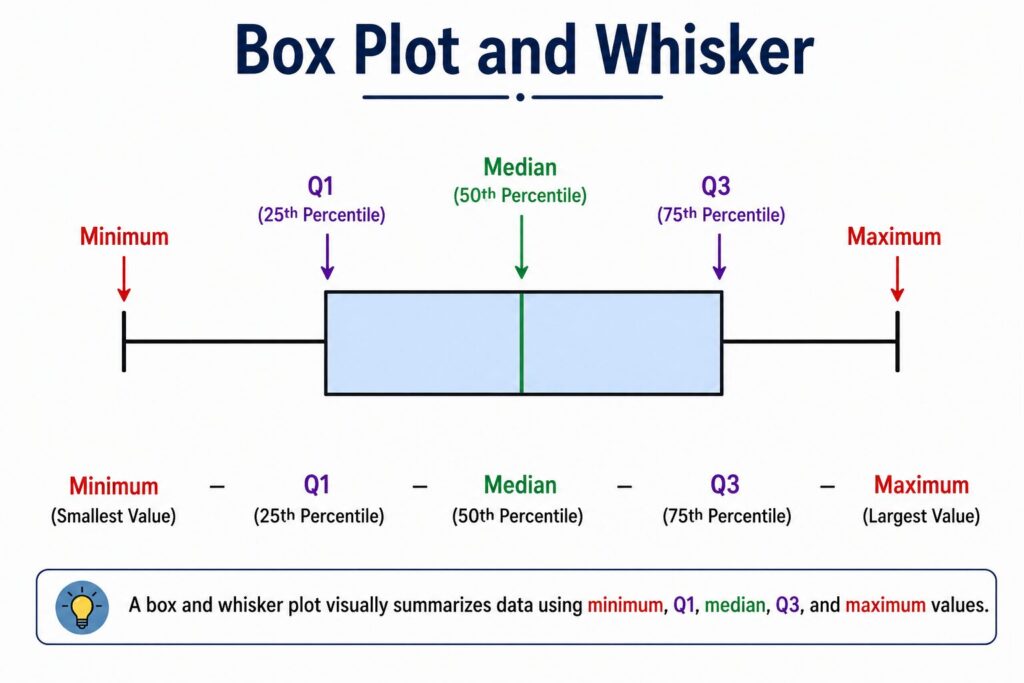
A box plot — also called a box-and-whisker plot — is a standardized chart that compresses an entire dataset’s distribution into a single, scannable graphic. At its core, it visualizes the five-number summary: minimum, first quartile, median, third quartile, and maximum. That compact structure is what makes it so valuable when dashboards are already crowded with competing figures.
The Box, the Whiskers, and What They Tell You
Understanding how to read box plots starts with distinguishing its two main components. The box represents the Interquartile Range (IQR) — the middle 50% of your data, spanning from the 25th percentile (Q1) to the 75th percentile (Q3). This is where the bulk of “typical” values live. The whiskers extend outward from either edge of the box, reaching toward the minimum and maximum values that still fall within an acceptable range. Any data points beyond the whiskers are flagged as outliers, plotted as individual dots or markers.
A running line through the interior of the box marks the median — and this detail matters more than it might seem. Unlike the mean, the median is resistant to extreme values. In skewed datasets, a mean can be dragged significantly by a handful of outliers, misrepresenting where the center of your data actually sits. According to Atlassian, the median’s robustness makes box plots especially reliable for real-world business data, which is rarely perfectly symmetrical.
Data Storytelling Through Distribution
A single box plot communicates shape, spread, and center simultaneously — something a bar chart or line graph simply can’t match. In practice, comparing multiple box plots side by side reveals whether two product lines share similar variability, or whether one team’s performance is consistently tighter than another’s.
That narrative power is precisely what the next section unpacks — breaking down each of the five structural pillars that give box plots their analytical depth.
The 5 Core Pillars: Understanding the Five-Number Summary
Effective box plot data visualization depends entirely on understanding the five numbers that power it. Every box and whisker plot encodes exactly five statistical values — no more, no less — and each one carries a distinct analytical role. Think of these five pillars as a compressed biography of your dataset, capturing its range, spread, and central tendency in a single structured form.
The five-number summary consists of:
- Minimum
- First Quartile (Q1)
- Median (Q2)
- Third Quartile (Q3)
- Maximum
Here’s how each element functions in practice.
First Quartile (Q1) — The 25th Percentile
Q1 marks the point below which 25% of your data falls. Visually, it defines the left edge of the box. In enterprise contexts, Q1 often signals the lower boundary of typical performance — anything consistently below it may warrant closer review.
Median (Q2) — The Reliable Middle
The median sits at the exact center of your sorted dataset, splitting it 50/50. The median is a more trustworthy measure of center than the mean whenever data is skewed, because extreme values can’t drag it off course. According to Highcharts, this resistance to outliers is precisely why the median is the preferred centerline in box plots used for operational and financial analysis.
Third Quartile (Q3) — The 75th Percentile
Q3 marks the point below which 75% of your data falls and defines the right edge of the box. The distance between Q1 and Q3 forms the Interquartile Range (IQR) — the core measure of spread within a box plot.
Maximum — The Upper Whisker Boundary
The maximum represents the highest data point that still falls within an acceptable range, calculated as Q3 plus 1.5 times the IQR. As SixSigma.us notes, any value beyond this threshold is plotted separately as an outlier rather than absorbed into the whisker.
The foundation starts, however, at the opposite end of the scale — with the minimum value, which deserves its own careful interpretation.
Minimum
Among all the exploratory data analysis tools in a data professional’s kit, the box plot stands out for how precisely it handles edge values — starting with the minimum. The minimum is the lowest data point still within 1.5 times the interquartile range below Q1. Critically, this is not always the absolute lowest value in the dataset. When outliers exist, those extreme values plot separately, and the whisker stops at the lowest non-outlier observation instead. Understanding this distinction prevents misreading your data’s true lower boundary — a subtle but important nuance as we move toward examining how Q1 and Q3 define the central 50% of your distribution.
First Quartile (Q1) and Third Quartile (Q3)
With the minimum anchoring the lower boundary, the next structural elements to master are Q1 and Q3 — the two values that form the actual box in any box and whisker plot. In any solid box plot tutorial data analysis, these quartiles receive significant attention because they carry the most actionable intelligence about your dataset’s core behavior.
Q1 (the first quartile) is the median of the lower half of your data — the point at which 25% of values fall below. Q3 (the third quartile) mirrors this on the upper half, marking the threshold where 75% of values fall below. Together, they define the Interquartile Range (IQR), calculated simply as Q3 − Q1.
The 50% of data captured between Q1 and Q3 represents your distribution’s most stable, reliable core. According to Atlassian’s complete guide to box plots, this middle band is where analysts focus when evaluating process consistency or comparing performance across segments.
In practice, a narrow IQR signals tight clustering and predictability. A wide IQR flags high variability — a warning sign in quality control or financial forecasting contexts. Both Q1 and Q3 work in tandem with the median, which sits at the heart of that box and deserves its own dedicated examination.
The Median and Maximum
With Q1 and Q3 defining the box’s boundaries, two remaining components complete the picture: the median and the maximum.
The median — also called Q2 — sits at the very center of the box and represents the true midpoint of your dataset. It’s the heart of the box plot. Where the median line falls within the box immediately signals distribution shape: a median pushed toward Q1 suggests right-skewed data, while one closer to Q3 indicates a left skew. The median’s position relative to the box edges is one of the fastest visual diagnostics available to enterprise analysts. Unlike the mean, the median resists distortion from extreme values, making it especially reliable when working with noisy operational datasets.
The maximum, meanwhile, marks the upper whisker’s endpoint — the highest observed value that still falls within the acceptable range defined by the 1.5×IQR rule, as explained by Creative Safety Supply. Any value beyond this threshold gets flagged separately as an outlier.
Understanding both elements sets you up perfectly to construct a complete box and whisker plot from scratch — which is exactly what the next section walks through, step by step.
Step-by-Step: How to Construct a Box and Whisker Plot
Now that you understand what each component represents — minimum, Q1, median, Q3, and maximum — it’s time to put those pieces together in a structured, repeatable process. Whether you’re building plots manually for a small dataset or configuring them in an analytics platform, understanding the underlying construction logic gives you far greater interpretive power.
Step 1: Order Your Data from Least to Greatest
Start by sorting your dataset in ascending order. This foundational step makes every calculation that follows both accurate and straightforward. Skipping this step is one of the most common errors in manual plot construction, and it cascades into incorrect quartile values.
Step 2: Find the Median (Q2)
With your data sorted, locate the middle value. For an odd-numbered dataset, this is the literal center point. For even-numbered datasets, average the two middle values. This is your Q2, the line that bisects the box and anchors the entire visualization.
Step 3: Calculate Q1, Q3, and the IQR
Split the dataset at the median into a lower half and an upper half. The median of the lower half is Q1; the median of the upper half is Q3. Subtract Q1 from Q3 to get the Interquartile Range (IQR) — the core measure of spread for the middle 50% of your data. As The Data School notes, the IQR is the most critical calculation in the entire construction process because it drives every boundary decision that follows.
Step 4: Determine the Whiskers Using the 1.5× IQR Rule
This is where precision matters. Calculate the lower fence (Q1 − 1.5 × IQR) and the upper fence (Q3 + 1.5 × IQR). The whiskers do not extend to these fences automatically — they extend only to the last actual data point that falls within each fence boundary. This distinction is frequently misunderstood, according to Atlassian’s complete guide to box plots.
Step 5: Identify and Plot Outliers as Individual Points
Any data point that falls beyond either fence is classified as an outlier and plotted individually — typically as a dot or asterisk — rather than being absorbed into the whisker. A single misidentified outlier can distort business conclusions drawn from an entire dataset, making this step critical for enterprise-grade accuracy.
With your plot fully constructed, the real analytical work begins: interpreting what the shape, spread, and symmetry are telling you about performance.
Interpreting the Results: Reading Skewness and Spread
Building a box and whisker plot is only half the work. The real analytical value emerges when you know how to read what the plot is telling you — and in enterprise data analytics, those signals can directly inform strategic decisions.
Box Width: Volatility at a Glance
The length of the box represents your interquartile range (IQR) — the distance between Q1 and Q3. A wide IQR signals high variability within the middle 50% of your dataset. In practice, a wide box on a sales performance chart might indicate inconsistent output across a regional team, while a narrow box suggests that most data points cluster tightly around the median. A compressed IQR is often a marker of process stability; a wide one is a call to investigate.
Whisker Length: Where the Majority Lives
The whiskers extend to the furthest non-outlier data points — typically 1.5× the IQR from each quartile. Long whiskers indicate that while extreme values exist, they still fall within an expected range. Short whiskers confirm that nearly all observations are tightly grouped. As Atlassian’s complete guide to box plots notes, unequal whisker lengths are one of the clearest early indicators of distributional asymmetry.
Detecting Skewness: When the Median Shifts
When the median line sits closer to Q1 than Q3, your data is right-skewed — meaning a concentration of lower values with a tail pulling toward higher ones. The reverse signals left skew. This asymmetry matters enormously for decisions like forecasting, budgeting, or risk assessment, where assuming a normal distribution without checking skewness can lead to costly errors.
Side-by-Side Comparison: Global Performance in One View
Placing multiple box plots along a single axis — segmented by region, product line, or time period — is where this chart type truly earns its place in enterprise dashboards. According to Exploratory Data Analysis research on YouTube, parallel box plots allow analysts to compare distribution shapes, medians, and spreads simultaneously without drowning in raw numbers.
That efficiency advantage becomes even more apparent when you weigh box plots against histograms — a comparison worth examining closely.
The Strategic Edge: Box Plots vs. Histograms
Understanding when to use a box plot versus a histogram is one of the more practical decisions a data scientist makes during exploratory analysis. Both visualize distribution, but they serve fundamentally different purposes — and confusing the two can slow down insight generation considerably.
Frequency vs. Distribution Summary
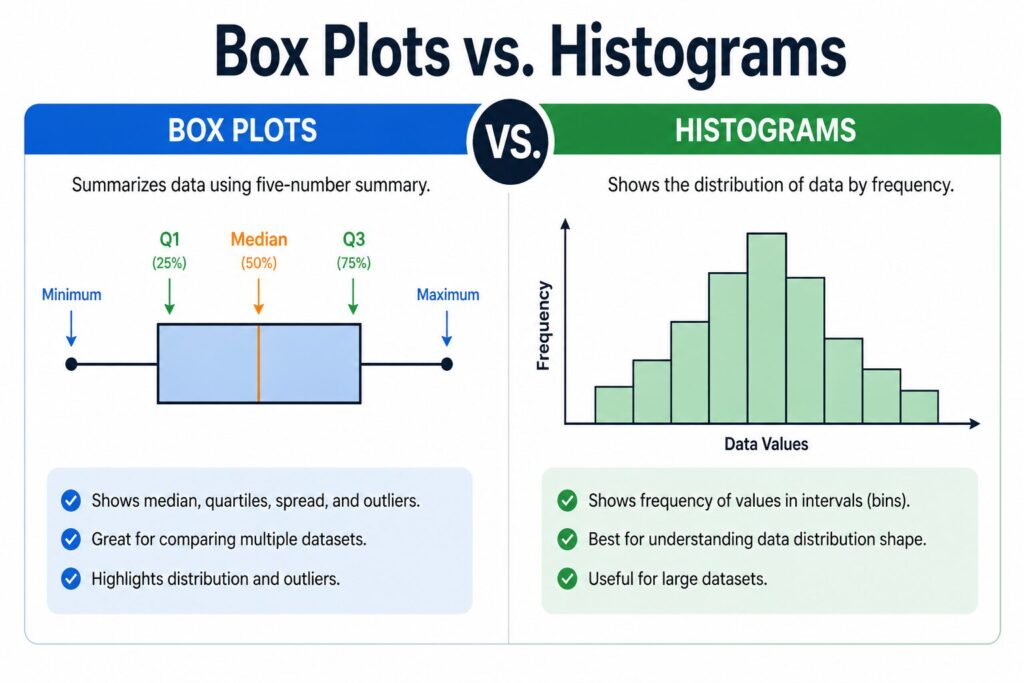
Histograms excel at showing frequency distribution — how often values fall within defined bins. They’re ideal when you need to understand the shape of a single dataset in granular detail, such as identifying bimodal patterns or visualizing a continuous variable’s full probability curve.
Box plots, by contrast, deliver a five-number summary at a glance: minimum, Q1, median, Q3, and maximum. They don’t show every data point, but that’s precisely the point. As noted in Exploratory Data Analysis: Box and Whisker Plots, this condensed format makes box plots especially powerful when comparing distributions across multiple groups simultaneously.
The Space Efficiency Advantage
Space efficiency is where box plots genuinely outperform histograms at scale. In practice, a dashboard displaying 10 side-by-side box plots takes roughly the same visual real estate as 2 histograms. For enterprise analytics teams comparing regional sales performance, product lines, or customer segments, that density is invaluable.
Outlier Visibility at Scale
Box plots also surface outliers more clearly in large datasets. Histograms can bury extreme values within wide bins, making anomalies easy to miss. A box plot flags them explicitly as isolated points beyond the whiskers — no bin size calibration required.
A Quick Decision Matrix
| Scenario | Use |
| Single variable, shape analysis | Histogram |
| Multi-group comparison | Box Plot |
| Outlier detection | Box Plot |
| Frequency counts matter | Histogram |
One practical approach is to use histograms during initial univariate exploration, then transition to box plots once comparisons or anomaly detection become the priority — which leads naturally into how those flagged outliers can protect the integrity of your predictive models.
Conclusion
Mastering the box and whisker plot isn’t a niche skill — it’s a foundational competency for any data professional working at the enterprise level. Throughout this guide, you’ve seen how box plots reveal distribution shape, surface outliers, and enable side-by-side dataset comparisons that other chart types simply can’t match with the same efficiency.
A well-constructed box plot communicates in seconds what raw data tables take minutes to process — and that speed translates directly into better business decisions.
In practice, the teams that get the most value from box plots are those that integrate them early in exploratory analysis, before modeling begins. The investment is low; the diagnostic payoff is high.
FAQ’s
How does a box plot differ from a histogram?
A histogram shows frequency distribution across bins. A box plot condenses that same data into five summary statistics — minimum, Q1, median, Q3, and maximum — making group comparisons far more efficient. Notes. Box plots are especially effective when comparing distributions across multiple categories simultaneously.
What defines a data point as an outlier?
The standard rule: any value falling below Q1 − 1.5×IQR or above Q3 + 1.5×IQR is flagged as an outlier and plotted individually beyond the whiskers.
Why use the median instead of the mean?
The median resists distortion from extreme values. In skewed distributions, the mean can misrepresent the center entirely, while the median holds firm — giving a more honest picture of typical performance.
Can box plots compare multiple datasets simultaneously?
Absolutely. Placing multiple box plots side by side on a shared axis is one of the format’s greatest strengths, enabling rapid cross-group comparisons across regions, time periods, or product lines.


