

Web scraping has become a critical skill in the age of big data, allowing businesses, researchers, and developers to collect real-time information from websites. Among the most popular tools for web scraping in Python, BeautifulSoup stands out as a powerful and beginner-friendly library for parsing HTML and XML documents.
Unlike complex frameworks, BeautifulSoup simplifies the process of navigating and modifying parse trees, making it an excellent choice for both beginners and experienced developers.
In this article, we’ll explore what makes BeautifulSoup such a powerful tool, walk through practical examples, and share tips for mastering web scraping like a pro.
Why Use BeautifulSoup for Web Scraping?
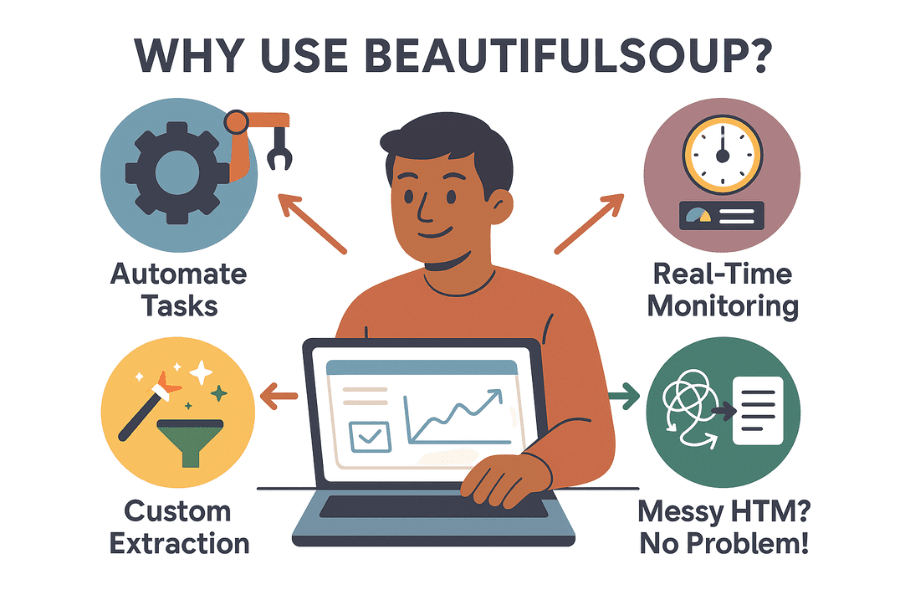
Web scraping can be challenging because websites often contain nested HTML elements, scripts, and unstructured content. Here’s why BeautifulSoup is the go-to library for many developers:
✔ Easy-to-Use Syntax: You can extract data using minimal lines of code.
✔ Flexible Parsing Options: Works with multiple parsers like html.parser, lxml, and html5lib.
✔ Supports Complex HTML: Handles broken HTML tags and poorly structured data gracefully.
✔ Integration with Requests: Easily pairs with requests to fetch web pages and parse them.
Core Features of BeautifulSoup
Here are some standout features that make BeautifulSoup one of the most widely used Python libraries for web scraping:
- HTML/XML Parsing: Quickly parses HTML and XML documents into a tree structure.
- Tag Searching: Find elements by tag name, CSS selector, or attributes.
- Tree Navigation: Navigate parent-child relationships with ease.
- Unicode Support: Handles non-ASCII characters efficiently.
- Built-in Methods: Methods like .find(), .find_all(), and .select() simplify data extraction.
Installing BeautifulSoup: A Quick Setup Guide
To use BeautifulSoup, install it with pip:
pip install beautifulsoup4
You’ll also need a parser like lxml or html5lib for better performance:
pip install lxml html5lib
How BeautifulSoup Works Under the Hood
BeautifulSoup takes raw HTML or XML content and converts it into a structured parse tree. This tree allows easy navigation and modification of elements.
For example:
from bs4 import BeautifulSoup
html_doc = "<html><head><title>Sample Page</title></head><body><p>Hello, World!</p></body></html>"
soup = BeautifulSoup(html_doc, 'html.parser')
print(soup.title.string)
# Output: Sample Page
Parsing HTML and XML with BeautifulSoup
BeautifulSoup can parse multiple formats, making it versatile:
- HTML Parsing: For web pages.
- XML Parsing: For APIs or structured documents.
Example for XML parsing:
xml_data = """<data><item>First</item><item>Second</item></data>"""
soup = BeautifulSoup(xml_data, 'xml')
print([item.text for item in soup.find_all('item')])
Key Functions and Methods in BeautifulSoup
Here are the most commonly used methods:
✔ find(name, attrs, recursive, string): Returns the first match.
✔ find_all(name, attrs, recursive, string): Returns a list of matches.
✔ select(selector): Search using CSS selectors.
✔ .string: Extracts text from tags.
✔ .get_text(): Extracts all text content from an element.
Real-Time Examples of BeautifulSoup in Action
Example 1: Extracting Headlines from a News Website
import requests
from bs4 import BeautifulSoup
url = "https://example-news.com"
response = requests.get(url)
soup = BeautifulSoup(response.text, 'html.parser')
headlines = [h.text for h in soup.find_all('h2')]
print(headlines)
Example 2: Scraping Product Details
url = "https://example-ecommerce.com"
response = requests.get(url)
soup = BeautifulSoup(response.text, 'html.parser')
products = soup.find_all('div', class_='product-title')
for product in products:
print(product.get_text())
Handling Complex Web Pages and Tags
Modern websites use dynamic content loaded via JavaScript. BeautifulSoup alone can’t handle JavaScript; for such cases, pair it with Selenium or Playwright.
Combining BeautifulSoup with Requests
BeautifulSoup works best when combined with the requests library to fetch data from URLs:
import requests
from bs4 import BeautifulSoup
response = requests.get("https://example.com")
soup = BeautifulSoup(response.content, 'html.parser')
print(soup.title.text)
Best Practices for Using BeautifulSoup
- Use specific selectors to avoid unwanted data.
- Always respect robots.txt and website terms.
- Implement rate limiting to prevent server overload.
- Validate and clean your scraped data.
Challenges in Web Scraping and How to Overcome Them
✔ Dynamic Content: Use tools like Selenium for JavaScript-heavy sites.
✔ CAPTCHA & Blocks: Use rotating proxies and user agents.
✔ Legal Issues: Always check a website’s terms of service.
Alternatives to BeautifulSoup
- lxml: Faster XML/HTML parser.
- Scrapy: A full-fledged web scraping framework.
- Selenium: For dynamic content scraping.
Deep Dive into BeautifulSoup Parsers
BeautifulSoup supports different parsers that affect speed and accuracy.
- html.parser: Default parser; Python built-in, decent speed.
- lxml: Extremely fast and supports XPath. Requires installation.
- html5lib: Very lenient and parses broken HTML into a valid tree.
Example:
soup = BeautifulSoup(html_doc, 'lxml') # Faster parsing
Advanced Searching Techniques
Besides .find() and .find_all(), BeautifulSoup offers advanced querying:
- CSS Selectors with .select()
soup.select('div.article h2.title') - Regex Search in Tags
import re
soup.find_all('a', href=re.compile('https'))
- Attribute Filters
soup.find_all('img', {'alt': True})
Extracting Links and Images
Web scraping often requires pulling hyperlinks and image URLs:
# Extract all links
links = [a['href'] for a in soup.find_all('a', href=True)]
# Extract all image URLs
images = [img['src'] for img in soup.find_all('img', src=True)]
Cleaning and Formatting Extracted Data
Raw data can be messy. Use Python functions to clean:
text = soup.get_text(separator=' ').strip()
clean_text = ' '.join(text.split()) # Remove extra spaces
Real-Time Use Cases for BeautifulSoup
- Price Monitoring: Track product prices from e-commerce sites like Amazon.
- Job Aggregation: Scrape job listings from portals like Indeed.
- Sports Stats: Extract live match scores and player stats.
- Sentiment Analysis: Collect reviews from websites for NLP projects.
- Job Listings Aggregation : Used by recruiters and career websites to collect data efficiently.
- Price Comparison Websites : Helps consumers find the best deals in real-time.
- Sports Score Tracking :Sports apps rely on scraping when official APIs are limited or expensive.
- Social Media Monitoring : Useful for brand monitoring and influencer marketing analytics.
- Cryptocurrency Price Monitoring :Traders and analysts use this for real-time investment decisions.
- Real Estate Data Collection : Scraping property listing sites like Zillow or Realtor to gather price trends, location details, and property images.Helpful for real estate agencies and housing market research.
- News and Media Aggregation : Scraping news websites for headlines, summaries, and URLs to create personalized news feeds.Used in media monitoring tools and research platforms.
- Academic Research: Collecting research papers, publication data, and citations from Google Scholar or PubMed.Saves researchers time in compiling large datasets for analysis.
- Airline and Travel Deals : Powers travel comparison platforms like Skyscanner.
- SEO Competitor Analysis : Extracting meta titles, descriptions, and keywords from competitor websites.Useful for digital marketers to optimize SEO strategies.
Handling Pagination in BeautifulSoup
Most websites paginate their content. Example:
page = 1
while True:
url = f"https://example.com/page/{page}"
response = requests.get(url)
if 'No more pages' in response.text:
break
# Parse content
page += 1
Error Handling & Robust Scraper
Web scraping often breaks due to site changes. Add error handling:
try:
response = requests.get(url, timeout=10)
response.raise_for_status()
except requests.exceptions.RequestException as e:
print(f"Error: {e}")
Integrating BeautifulSoup with Pandas
Convert scraped data into a DataFrame for analysis:
import pandas as pd
data = {'Product': ['Laptop', 'Phone'], 'Price': [1000, 500]}
df = pd.DataFrame(data)
df.to_csv('products.csv', index=False)
Performance Optimization Tips
- Use lxml parser for faster parsing.
- Avoid unnecessary DOM traversal.
- Limit .find_all() calls by using specific CSS selectors.
Legal & Ethical Considerations
Scraping can lead to legal trouble if done improperly:
- Always check robots.txt.
- Avoid scraping personal data.
- Implement rate-limiting and headers to mimic human behavior.
BeautifulSoup vs Other Tools
| Feature | BeautifulSoup | Scrapy | Selenium |
| Ease of Use | ✔✔✔ | ✔✔ | ✔✔✔ |
| Speed | Medium | Fast | Slow |
| Handles JS | ❌ | ❌ | ✔ |
| Best Use Case | Static pages | Large-scale | Dynamic sites |
Embedding Code Output Images or GIFs
Add screenshots or GIFs showing:
- Parsing HTML into a tree structure.
- Extracting real product data from an e-commerce page.
- Converting scraped data to CSV.
Future of Web Scraping with BeautifulSoup
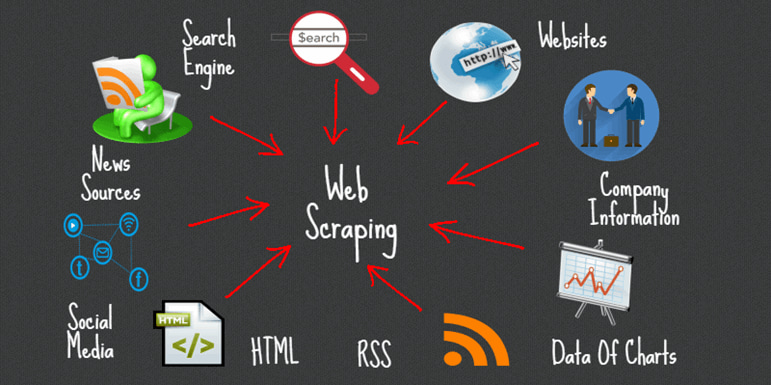
As websites become more dynamic, BeautifulSoup will remain relevant for structured data extraction, especially when combined with other automation tools.
AI-Powered Scraping Enhancements
- Integration of AI and ML models with BeautifulSoup will allow automatic data extraction without manually defining selectors.
- Smart parsers could predict patterns and adapt to HTML structure changes automatically.
Increased Focus on Anti-Scraping Measures
- Websites are implementing CAPTCHAs, dynamic content, and bot detection.
- Future BeautifulSoup workflows may need hybrid solutions with tools like Selenium or Playwright to handle JavaScript-heavy and protected pages.
Automation & Cloud-Based Scraping
- Integration with cloud platforms for distributed scraping will become more common.
- Serverless functions (like AWS Lambda) combined with BeautifulSoup can scale scraping tasks.
BeautifulSoup + Headless Browsers
- As websites use more dynamic content, combining BeautifulSoup with headless browsers (like Playwright or Puppeteer) will be essential.
- This ensures rendering of JavaScript before parsing.
Ethical & Legal Compliance Automation
- Future scraping tools may include built-in legal compliance checks (robots.txt parsing, rate-limiting, and data anonymization).
- Compliance with GDPR and other privacy laws will become mandatory.
Real-Time Data Pipelines
- Integration of BeautifulSoup with streaming technologies (like Apache Kafka) will allow real-time scraping and data processing.
- Useful for financial markets, sports scores, and news monitoring.
Support for Structured Data Extraction
- BeautifulSoup may add native support for JSON-LD and microdata, making structured data extraction easier.
- This will align with SEO-driven web designs.
Performance Improvements
- Faster parsing engines or multi-threaded parsing support could be added to handle huge HTML files efficiently.
- Caching mechanisms to avoid repeated parsing for similar structures.
Built-in Data Cleaning & Normalization
- Future updates might include features for automatic HTML cleanup, removing ads, and standardizing data formats before storage.
Integration with NLP and Computer Vision
- Extracted data may be combined with NLP for sentiment analysis or image recognition for product details.
- This can lead to richer datasets for AI applications.
Final Thoughts
✦ SUMMARIZE THIS ARTICLE WITH AI
 ChatGPT
BeautifulSoup is a must-have tool in every Python developer’s toolkit for web scraping. It’s easy to use, powerful, and integrates seamlessly with other Python libraries. Whether you’re extracting headlines, analyzing e-commerce prices, or building datasets, BeautifulSoup simplifies the process.


