Project management requires clear planning, structured workflows, and proper execution. Organizations across industries depend on tools that can simplify complex project timelines.
One of the most widely used tools for this purpose is the Gantt Chart.
Understanding how a Gantt Chart works can help teams improve coordination, meet deadlines, and achieve project goals efficiently.
What is a Gantt Chart?
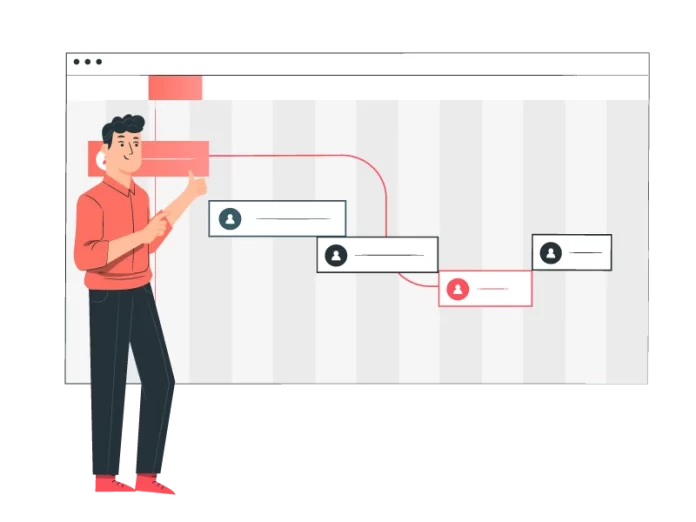
A Gantt Chart is a visual representation of a project schedule.
It displays:
- Tasks
- Timelines
- Dependencies
- Progress
Key Idea:
Each task is represented as a horizontal bar across a timeline.
History of Gantt Chart
The Gantt Chart was developed by Henry Gantt in the early 20th century.
It was initially used for:
- Industrial projects
- Manufacturing processes
Today, it is widely used in:
- IT projects
- Construction
- Marketing campaigns
Why Gantt Chart is Important
A Gantt Chart provides clarity in project execution.
Importance:
- Visual timeline of tasks
- Improved team coordination
- Better resource allocation
Key Components of a Gantt Chart
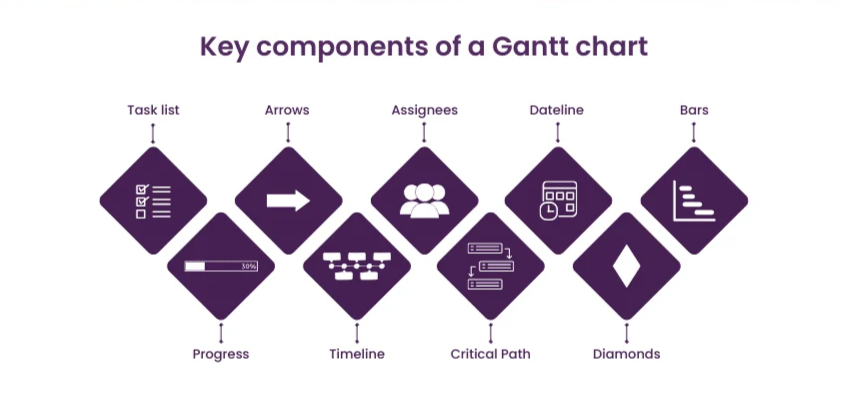
Essential elements:
- Task list
- Start and end dates
- Timeline
- Dependencies
- Milestones
How a Gantt Chart Works
A Gantt Chart organizes tasks over time.
Example:
Project: Website Development
- Design phase: Week 1–2
- Development: Week 3–6
- Testing: Week 7–8
Each phase is represented visually.
Real-Time Examples of Gantt Chart
Example 1: Software Development
Tasks include:
- Requirement analysis
- Coding
- Testing
Example 2: Marketing Campaign
- Content creation
- Promotion
- Analytics tracking
Example 3: Construction Project
- Planning
- Material procurement
- Execution
Benefits of Using a Gantt Chart
Advantages:
- Clear visualization
- Better time management
- Improved productivity
Limitations of Gantt Chart
Drawbacks:
- Can become complex
- Requires updates
- Not ideal for very small tasks
Gantt Chart vs Other Project Tools
Gantt Chart:
- Timeline-focused
Kanban:
- Workflow-focused
Scrum:
- Iterative approach
How to Create a Gantt Chart
Steps:
- Define project tasks
- Set timelines
- Identify dependencies
- Assign resources
- Track progress
Tools for Creating Gantt Chart
Popular tools include:
- Microsoft Excel
- Google Sheets
- Project management software
Gantt Chart in Agile and Modern Workflows
Although traditionally used in waterfall models, Gantt Chart is now adapted for Agile workflows.
Use cases:
- Sprint planning
- Roadmap visualization
Critical Path Method (CPM) in Gantt Chart
One of the most powerful features of a Gantt Chart is its ability to support Critical Path Method (CPM).
What is Critical Path?
The critical path is the longest sequence of tasks that determines the minimum project duration.
Why It Matters:
- Any delay in critical tasks delays the entire project
- Helps prioritize high-impact activities
Example:
If tasks A → B → C take the longest time, they form the critical path.
Resource Management Using Gantt Chart
Efficient resource allocation is crucial for project success.
Gantt Chart helps in:
- Assigning team members to tasks
- Avoiding resource overload
- Tracking workload distribution
Example:
If one developer is assigned too many tasks, the chart highlights bottlenecks.
Task Dependencies in Gantt Chart
Dependencies define how tasks are connected.
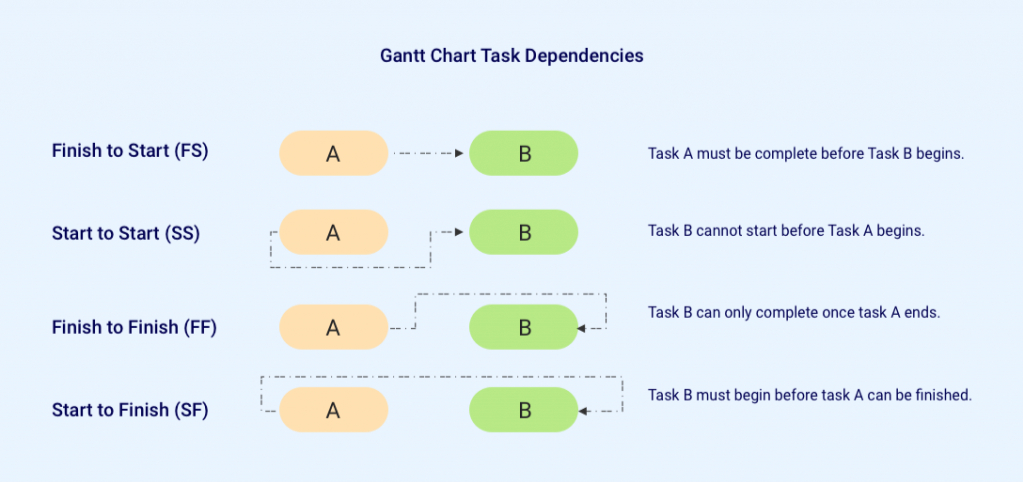
Types of Dependencies:
- Finish-to-Start (FS)
- Start-to-Start (SS)
- Finish-to-Finish (FF)
- Start-to-Finish (SF)
Importance:
Dependencies ensure tasks are completed in the correct order.
Milestones in Gantt Chart
Milestones represent key project achievements.
Examples:
- Project kickoff
- Prototype completion
- Final delivery
Benefits:
- Track major progress points
- Improve stakeholder communication
Gantt Chart for Remote Teams
With remote work becoming common, Gantt Charts play a vital role.
Benefits:
- Real-time collaboration
- Clear visibility of tasks
- Improved accountability
Gantt Chart in Software Development Lifecycle
Gantt Charts are widely used in software projects.
Phases:
- Requirement gathering
- Design
- Development
- Testing
- Deployment
Advantage:
Helps track progress across all stages.
Gantt Chart in Marketing Campaigns
Marketing teams use Gantt Charts for campaign planning.
Example Tasks:
- Content creation
- Social media scheduling
- Email campaigns
Outcome:
Better coordination and timely execution.
Gantt Chart for Event Planning
Event managers rely heavily on Gantt Charts.
Tasks Include:
- Venue booking
- Vendor coordination
- Guest management
Benefit:
Ensures smooth event execution.
Gantt Chart in Construction Projects
Construction projects are complex and long-term.
Gantt Chart helps in:
- Tracking multiple phases
- Managing contractors
- Monitoring deadlines
Automation in Gantt Chart Tools
Modern tools offer automation features.
Features:
- Auto-adjust timelines
- Dependency updates
- Notifications
Gantt Chart and Risk Management
Risk management is critical in projects.
Gantt Chart helps:
- Identify delays early
- Track risk-prone tasks
- Plan mitigation strategies
Gantt Chart Customization
Customizing charts improves usability.
Custom Options:
- Color coding
- Labels
- Task grouping
Gantt Chart vs Timeline Charts
Gantt Chart:
- Detailed task-level view
Timeline Chart:
- High-level overview
Use Case:
Use Gantt for execution, timeline for presentation.
Gantt Chart in Strategic Planning
Organizations use Gantt Charts for long-term planning.
Applications:
- Business expansion
- Product launches
- Organizational goals
Integration with Collaboration Tools
Gantt Charts integrate with tools like:
- Task management systems
- Communication platforms
Benefit:
Improved team coordination.
Real-Time Tracking and Updates
Modern Gantt tools provide real-time updates.
Advantages:
- Immediate visibility
- Faster decision-making
Gantt Chart for Startups
Startups use Gantt Charts to:
- Plan product development
- Manage limited resources
- Track growth milestones
Scaling Projects with Gantt Chart
Large projects require scalable solutions.
Strategy:
- Break into smaller phases
- Use multiple Gantt charts
Gantt Chart Reporting and Analytics
Analytics enhance project insights.
Metrics:
- Task completion rate
- Delay analysis
- Resource utilization
Hybrid Project Management with Gantt Chart
Modern teams use hybrid approaches.
Combination:
- Gantt Chart + Agile
- Gantt Chart + Kanban
Gantt Chart Templates for Different Industries
Templates simplify usage.
Examples:
- IT project template
- Marketing template
- Construction template
Role of Gantt Chart in Decision Making
Managers use Gantt Charts for:
- Resource planning
- Timeline adjustments
- Strategic decisions
Cost Estimation Using Gantt Chart
Gantt Charts help estimate costs.
Approach:
- Assign cost to tasks
- Track budget vs actual
Gantt Chart in Education and Research
Used for:
- Thesis planning
- Research timelines
- Academic projects
Program and Portfolio Management with Gantt Chart
Beyond individual projects, Gantt Chart is used in program and portfolio management.
Program Management:
- Manages multiple related projects
- Aligns timelines across projects
Portfolio Management:
- Prioritizes projects based on business goals
- Allocates resources across initiatives
Advanced Insight:
A master Gantt Chart can visualize dependencies across multiple projects simultaneously.
Multi-Project Dependencies and Cross-Team Coordination
Large enterprises run multiple projects at once.
Challenges:
- Shared resources
- Interdependent timelines
- Cross-team communication
Gantt Chart Solution:
- Link tasks across projects
- Track shared milestones
- Avoid scheduling conflicts
Gantt Chart in DevOps and Continuous Delivery
Modern DevOps workflows also leverage Gantt Chart concepts.
Use Cases:
- Release planning
- Deployment timelines
- Infrastructure updates
Integration:
- CI/CD pipelines
- Version control systems
Earned Value Management (EVM) with Gantt Chart
EVM is a powerful project performance measurement technique.
Key Metrics:
- Planned Value (PV)
- Earned Value (EV)
- Actual Cost (AC)
Benefits:
- Tracks cost vs schedule
- Predicts project outcomes
Predictive Analytics in Gantt Chart
Modern tools use analytics to predict outcomes.
Capabilities:
- Delay prediction
- Resource shortage alerts
- Timeline optimization
AI-Powered Gantt Chart Automation
Artificial Intelligence is transforming Gantt Charts.
Features:
- Auto task scheduling
- Smart dependency mapping
- Predictive risk detection
Example:
AI suggests optimal timelines based on past project data.
Gantt Chart and Digital Transformation
Organizations undergoing digital transformation rely heavily on structured planning.
Role:
- Manage transformation phases
- Track technology adoption
- Align teams across departments
Dynamic Gantt Charts with Real-Time Data Integration
Static charts are outdated.
Modern Approach:
- Integrate with live data sources
- Auto-update progress
Benefit:
Real-time decision-making.
Gantt Chart in Data Engineering Pipelines
Data teams use Gantt Charts to manage pipelines.
Workflow:
- Data ingestion
- Data processing
- Model training
- Deployment
Advanced Resource Leveling Techniques
Resource leveling ensures balanced workload.
Methods:
- Adjust task schedules
- Reassign resources
- Prioritize critical tasks
Time Buffering and Slack Time Optimization
Slack Time:
Extra time available without delaying project.
Buffer Strategy:
- Add buffers to critical tasks
- Reduce risk of delays
Gantt Chart for Regulatory and Compliance Projects
Highly regulated industries require strict timelines.
Examples:
- Banking compliance
- Healthcare regulations
- Government projects
Benefit:
Ensures deadlines are met with precision.
Visualization Techniques for Executive Reporting
Executives need simplified views.
Techniques:
- Summary Gantt charts
- Milestone-focused views
- Color-coded priorities
Gantt Chart and OKR Alignment
Objectives and Key Results (OKRs) can be aligned with Gantt Charts.
Approach:
- Map tasks to objectives
- Track progress visually
Risk Heatmaps Integrated with Gantt Chart
Advanced systems combine Gantt Charts with risk analysis.
Visualization:
- High-risk tasks highlighted
- Risk severity indicators
Dependency Mapping Using Graph Theory
Advanced Gantt Charts use graph-based models.
Concepts:
- Nodes = tasks
- Edges = dependencies
Benefit:
Better optimization and analysis.
Monte Carlo Simulation in Gantt Chart Planning
Used for risk forecasting.
Process:
- Simulate multiple project scenarios
- Estimate probability of completion
Gantt Chart in Product Lifecycle Management
Tracks entire product lifecycle.
Stages:
- Ideation
- Development
- Launch
- Maintenance
Integration with ERP Systems
Enterprise Resource Planning systems integrate with Gantt Charts.
Benefits:
- Unified data
- Better planning
- Financial tracking
Gantt Chart for Capacity Planning
Capacity planning ensures optimal resource usage.
Approach:
- Analyze team capacity
- Allocate tasks accordingly
Advanced Scheduling Algorithms
Modern tools use algorithms for scheduling.
Examples:
- Heuristic scheduling
- Constraint-based scheduling
Gantt Chart in Supply Chain Management
Used for logistics and operations.
Applications:
- Inventory planning
- Delivery scheduling
- Vendor coordination
Behavioral Insights from Gantt Chart Usage
Data from Gantt Charts reveals patterns.
Insights:
- Team productivity trends
- Delay patterns
- Resource inefficiencies
Custom KPI Tracking within Gantt Chart
Advanced dashboards include KPIs.
Examples:
- Task completion rate
- Time variance
- Budget variance
Gantt Chart Version Control and Audit Trails
Enterprise systems track changes.
Features:
- Version history
- Audit logs
- Change tracking
Security and Access Control in Gantt Systems
Sensitive projects require security.
Measures:
- Role-based access
- Data encryption
- Permission control
Gantt Chart for Global Distributed Teams
Global teams require coordination across time zones.
Solution:
- Time-zone aware scheduling
- Centralized dashboards
Advanced Collaboration Features
Modern tools support:
- Comments on tasks
- File attachments
- Real-time communication
Gantt Chart in Innovation and R&D Projects
R&D projects require flexibility.
Benefit:
- Track experiments
- Manage timelines
Future Trends in Gantt Chart Technology
Emerging Trends:
- AI-based scheduling
- Predictive analytics
- Automated planning
Best Practices for Using Gantt Chart
Tips:
- Keep tasks simple
- Update regularly
- Use dependencies wisely
Advanced Features in Gantt Chart
Features include:
- Critical path analysis
- Resource allocation
- Progress tracking
Common Mistakes to Avoid
Avoid:
- Overcomplicating tasks
- Ignoring dependencies
- Not updating regularly
Advanced Use Cases of Gantt Chart
Enterprise Planning:
Large organizations use Gantt Chart for:
- Multi-team coordination
- Strategic planning
Data-Driven Decision Making:
Integrating Gantt Chart with analytics tools helps:
- Predict delays
- Optimize workflows
Gantt Chart in Data and AI Projects
In AI projects, Gantt Chart helps manage:
- Data collection
- Model training
- Deployment
Integration with Business Intelligence Tools
Gantt Chart can be integrated with:
- Dashboards
- Reporting systems
Future of Gantt Chart
The future includes:
- AI-powered planning
- Automation
- Real-time updates
Conclusion
A Gantt Chart is a powerful tool for project planning and workflow optimization. It provides a structured way to visualize tasks, manage timelines, and improve collaboration.
By mastering Gantt Chart techniques, professionals can enhance productivity, reduce delays, and successfully deliver projects across industries.
FAQ’s
What makes an effective Gantt chart?
What makes an effective Gantt chart?
An effective Gantt chart clearly shows tasks, timelines, dependencies, and progress, helping teams track project schedules, manage resources, and ensure timely completion.
What is the best Gantt chart?
An effective Gantt chart clearly shows tasks, timelines, dependencies, and progress, helping teams track project schedules, manage resources, and ensure timely completion.
What are the 7 important elements of a Gantt chart?
The seven important elements of a Gantt chart are tasks, timeline, start date, end date, dependencies, milestones, and progress, helping to plan, track, and manage project workflows effectively.
What is better than a Gantt chart?
Alternatives better than a Gantt chart depend on the use case, but options like Kanban boards, Agile sprint boards, and timeline roadmaps can be more flexible for dynamic projects, offering better real-time collaboration and adaptability.
What is the main disadvantage of a Gantt chart?
The main disadvantage of a Gantt chart is that it can become complex and difficult to manage for large or dynamic projects, especially when tasks and dependencies frequently change.


