
When working with Python, managing packages efficiently is vital to building scalable and maintainable applications. The command pip install is the most commonly used method for installing packages and dependencies from the Python Package Index (PyPI) and other repositories.
This article provides a complete overview of how to pip install, including practical examples, advanced tips, and real-world use cases. Whether you’re setting up a new project, working in a virtual environment, or troubleshooting dependency issues, mastering pip is essential for a smooth Python development experience.
What Is pip in Python?
pip stands for “Pip Installs Packages.” It is the default package manager for Python and allows you to install, update, and manage third-party libraries that extend Python’s capabilities.

Pip connects directly to PyPI — the official third-party software repository for Python — enabling seamless installation of thousands of open-source libraries like NumPy, Pandas, Flask, Django, and TensorFlow.
Why pip install Is Crucial for Python Developers
- Access to Thousands of Libraries: From data analysis to web development and machine learning, pip install gives access to over 400,000 projects on PyPI.
- Dependency Management: It helps manage dependencies required for Python projects efficiently.
- Simplified Environment Setup: Automates installation of packages with specific versions for project consistency.
- Cross-Platform: Works the same way across Windows, macOS, and Linux.
Prerequisites for Using pip
Before using pip install, ensure:
- Python is installed on your system (preferably Python 3.6+).
- Pip is installed and updated.
- Internet access is available for downloading packages.
- (Optional) A virtual environment is activated for project-specific dependencies.
Check Python and pip versions:
python --version
pip --version
If pip is not recognized, you may need to add it to your system’s PATH or install it manually.
How to Install pip
On most modern systems, pip is installed automatically with Python. If not:
a. Using get-pip.py
Download the script and install:
curl https://bootstrap.pypa.io/get-pip.py -o get-pip.py
python get-pip.py
b. Linux Systems
Install using the package manager:
sudo apt install python3-pip # Ubuntu/Debian
c. macOS with Homebrew
brew install python # Installs Python and pip
Understanding the pip install Command
The basic syntax is:
pip install package-name
Examples:
pip install requests
pip install numpy
You can also specify versions:
pip install pandas==1.5.3
Or upgrade to the latest:
pip install --upgrade pandas
To install multiple packages:
pip install pandas matplotlib seaborn
Real-Time Examples of pip install
Example 1: Installing a Data Analysis Stack
A data scientist might install the following in one command:
pip install pandas numpy matplotlib seaborn scikit-learn
This enables real-time data processing, model training, and visualization in one Jupyter Notebook environment.
Example 2: Installing Web Development Tools
A backend developer building a Flask API might use:
pip install flask gunicorn flask-cors
This stack enables API building, CORS handling, and deployment.
Using pip install with Virtual Environments
Using virtualenv or venv is a best practice to avoid package conflicts between projects.
python -m venv myenv
source myenv/bin/activate # Linux/macOS
myenv\Scripts\activate # Windows
pip install requests
This ensures packages are isolated and specific to your project.
Installing from Requirements Files
In team or production settings, it’s common to define dependencies in a requirements.txt file.
# requirements.txt
flask==2.3.2
sqlalchemy>=2.0
gunicorn
Install using:
pip install -r requirements.txt
This replicates environments across machines and CI/CD pipelines.
Upgrading and Uninstalling Packages with pip
Upgrading:
pip install --upgrade package-name
Uninstalling:
pip uninstall package-name
To uninstall all packages:
pip freeze > requirements.txt
pip uninstall -r requirements.txt -y
Handling Common Errors in pip install
a. SSL or Certificate Errors
Try:
pip install --trusted-host pypi.org --trusted-host files.pythonhosted.org package-name
b. Permission Denied
Use:
pip install --user package-name
Or run with admin privileges (not recommended for shared environments):
sudo pip install package-name
c. Version Conflicts
Use virtual environments or pipdeptree to inspect conflicts.
Advanced pip install Techniques
Install from GitHub
pip install git+https://github.com/psf/requests.git
Install Wheel File
pip install some_package-1.0.4-py3-none-any.whl
Install Local Directory
pip install ./my_package/
External Tools That Work with pip
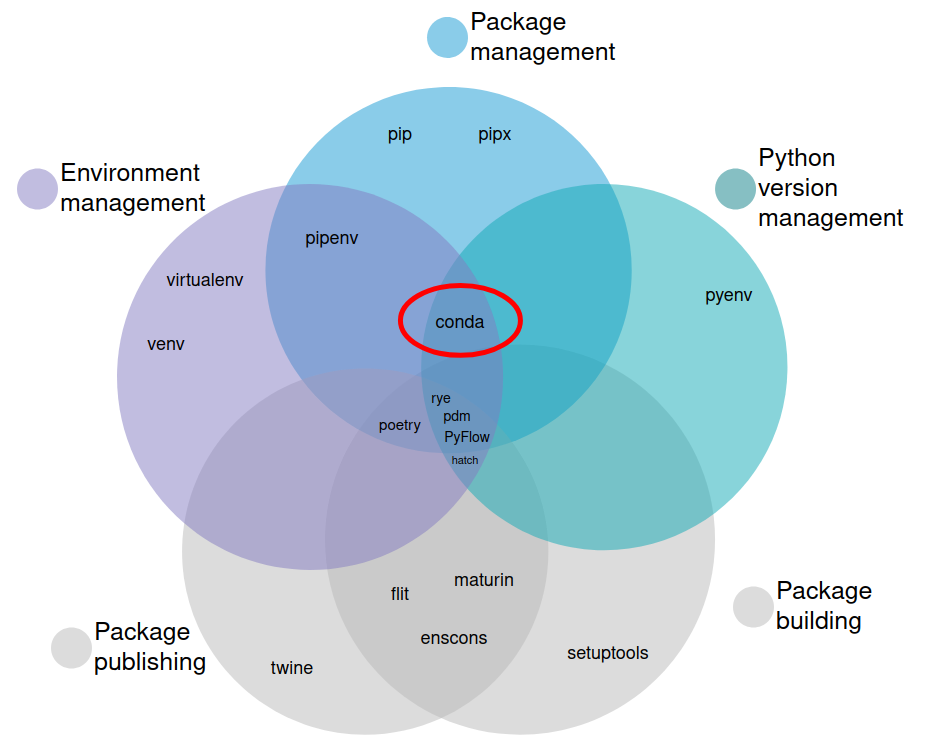
- Poetry – Simplified dependency and packaging.
- Pipenv – Pip + Virtualenv management.
- Conda – Alternative package manager for scientific computing.
- pip-tools – For managing pinned requirements.
These tools add automation, version control, and reproducibility.
Best Practices When Using pip install
- Use a requirements.txt for project consistency.
- Prefer installing inside virtual environments.
- Avoid using sudo unless necessary.
- Freeze dependencies for production:
pip freeze > requirements.txt
- Regularly update pip:
pip install --upgrade pip
- Check outdated packages:
pip list --outdated
Internal and External Resources
Internal Links:
- Python Environment Setup Guide
- Python vs Anaconda for Data Science
External DoFollow Links:
- pip Documentation (Official)
- PyPI (Python Package Index)
- Python.org – pip Installation Guide
Conclusion
Mastering how to pip install is fundamental to working effectively with Python. From simple installations to managing virtual environments and complex dependency trees, pip is the backbone of modern Python workflows.
Whether you’re setting up your first Flask API or deploying a machine learning pipeline, the knowledge of pip install ensures smooth, reproducible environments and faster development cycles.
✦ SUMMARIZE THIS ARTICLE WITH AI
 ChatGPT
If you’re new to Python, consider bookmarking this guide and referring to it whenever you’re managing packages.